
At last, the second issue of TechTalk. Don't worry, this one will be a lot more fun, since we'll be discussing current technology instead of out-dated one, and because finally, you'll get to understand why we easily claim that a smartphone's CPU is not up to standards while another one's is. Granted, the future is moving fast, and for you to fully understand the current context of mobile CPUs we'll need another issue, but with this one, you'll be able to look into a smartphone's face and not be fooled by the headlines "new", "coming soon" and "800 Mhz clock speed", because sadly, many smartphones being released today still don't offer the latest technology they should.
So please, join us and give us your own opinion in the comments section below. Before moving on though, if you've not read our first issue of TechTalk, we encourage you to please do so, since it's essential for fully understanding this post.
More basics: Multi-tasking & Threading

Before we keep going, we'd like to introduce you the concept of threads. As we explained in the first issue of TechTalk, computer programs are composed of a sequence of instructions, which are executed one after another in the CPU; if the CPU supports executing different instructions throughout its stages, we call it a pipelined processor.
Now, many things we said were over-simplified, since what we want is you to understand why an ARM architecture is better than another one, how the performance improvements are achieved, and at what cost. However, we think it's important for you to know about this. In modern operating systems, when we make the CPU execute a program, this program being run receives the name of an Operating System process. It's called a process because every program running in the Operating System gets its own "space" of computer memory, CPU time and other system resources; when an Operating System can handle many processes at the same time, we call it a multi-tasking Operating System. If you're thinking: "how can the CPU run multiple programs at the same time?" Don't worry, we're also here to explain it to you.

As you know, the ARM11 CPU (which is our current benchmark) has a single pipeline, so it's designed to execute instructions of the same program one after another. How does the Operating System manage to run multiple processes at a time with an ARM11 or similar CPU? Well, many times, in computer science, it's all about the user's perception. The trick is to cut the time each process has running inside the CPU into "slices", and what the OS does is assign these time slices to the processes (there's a whole science revolving around how the OS should manage CPU time, we just want you to get the idea) within the same second, so in time, what the user perceives is that all processes are being executed at the same time, or in parallel, because all the programs are performing their tasks individually. How is this done in hardware? The CPU performs what we call a "context switch", this means that all the information the CPU needs to execute the current process (internal registers, all the instructions in the pipeline, data required by the OS to run the process, etc.) is saved to a memory, and then all the data required for the process we're switching to, is loaded into the CPU, and then it simply resumes execution of the current process until the next context switch. This context switch is a very valuable resource, and every second, a CPU will perform a context switch a thousand times to keep all of the OS' processes running. However, the OS needs to be smart about when to assign the CPU to a process and for how long, since we're also looking for performance here too, and the choices made by the OS are critical. To give you an idea of how critical these choices are, the "hangups" we perceive while using our computers, netbooks, smartphones, etc., are caused because the CPU is executing a process which is not giving up the CPU to the OS, and therefore, all the other processes are left waiting, including the User Interface. To tackle this, OS' have mechanisms to force a process out of the CPU, and keep the system running, like the "Process is not responding" message we get in Android so many times.

Back to processes. We needed to explain how an OS and a standard CPU work while multi-tasking for you to understand why threads are useful. We said a program is a series of instructions executed by the CPU, and although it's true in someway, it's not the end of the story. A process is actually made up of threads, where a thread really is a sequence of instructions being executed inside the CPU. How is this useful? Well, a multi-tasking Operating System requires processes to be run at the same time, or in parallel, and the idea behind threads is that processes also need different tasks to be performed at the same time, only that these tasks or threads work together to make your program run, rather than making many programs run at the same time (OS). Why would a program/process need different threads? Well, take, for instance, your favourite desktop music player. When you're scrolling through your music library, the program must respond to your clicks and update what you're seeing on the screen. However, at the same time, you might want to be listening to music, and that's a problem, since playing music and keeping the User Interface (UI) of the program responsive are completely different tasks which require completely different instructions to be executed. One thing we could do is to not allow you to use the program while you're playing music until the song is finished, but the solution we all want is to do both things at the same time, and this is achieved using threads. Your desktop music application will "spawn" two different threads, one for playing music, and another one for keeping the UI responsive to your mouse movements and clicks.
Due to the fact that most processes have more than one thread, modern OS' tend to assign CPU time to the threads, rather than the processes themselves. Again, there's a whole lot of stuff we're not telling you, but now you understand how the OS performs multi-tasking.
Introducing the superscalar processor
Up 'til now, we've not advanced in computer hardware architecture, because we've been focusing on how it's being used. Now is when we present you a new hardware concept: scalar processors. A scalar processor is a CPU like the one we've been studying, the ARM11, because it can complete 1 instruction per clock cycle at maximum speed; the first CPU example we saw, which was not pipelined, was a sub-scalar processor, because it achieved less than one instruction per clock cycle at maximum speed.
Now, the problem we've had about speed is that making the pipeline longer had a serious effect on performance when the CPU failed to predict the next instruction which had to be executed, because the longer the pipeline is, the longer it takes to re-fill it again and return to our 1 instruction per clock cycle maximum speed. So how can we improve speed, without making the pipeline ridiculously long like Intel did with the Pentium 4? Well, instead of making the pipeline longer, why don't we make it wider?
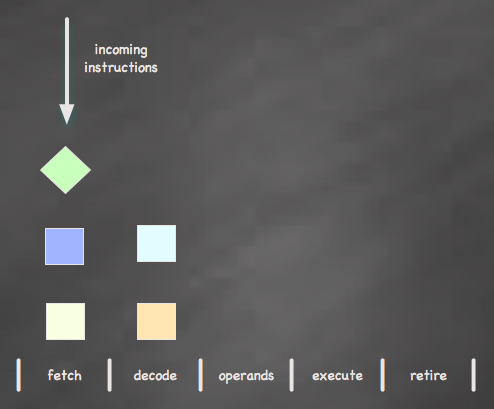
If, instead of making the pipeline longer, we make it wider, allowing more than one instruction to be executed in every stage of the pipeline, we get a superscalar processor, which is capable of delivering more than one instruction per clock cycle. This superscalar processor is also a parallel processor, because it can execute multiple instructions simultaneously. If we gave our CPU the ability to execute two instructions at a time, we would achieve a maximum performance of two instructions per clock cycle, delivering as much as twice the performance as before, with the same pipeline length, and at the same speed. Why wasn't this thought about before? Because a superscalar processor doesn't have to simply execute one instruction after another, it has to execute two instructions at the same time, both of them belonging to the same thread. Many times, instructions depend one upon the other, and this is a new issue which must be dealt with inside the CPU, since the OS does not need to know the CPU can run two instructions at a time; the OS can take this information into account to improve overall system performance, but it's not the OS's job to control how these instructions can be executed in parallel, that's the responsibility of the CPU.
To try to help you understand the potential problems, we'll give you an example. Suppose we need to execute these instructions:
# Instruction 0: a = 5
# Instruction 1: b =2
# Instruction 3: a = a + 2
# Instruction 4: b = b + a*a
First, let's look at what happens in standard sequential execution; if we used our standard ARM11 CPU, these instructions would be executed one by one, and the final result would be a = 7 and b = 51. In our new design, we have instructions 0 & 1 being executed at the same time, which is not a problem since their results do not depend on each other. However, when instructions 3 & 4 are executed, we find out that they are dependent on each other, so we cannot execute instruction 4 until instruction 3 is finished. If the CPU were to ignore that instruction 3 modifies the value of a, it would execute instruction 4 thinking that the value of a is 5 (instead of 7), and in the end the results would be a = 5 and b = 27, which is not correct. To prevent this from happening, we must make the CPU check before execution if the instructions are dependent on each other, which of course, takes time, and therefore, has a cost in performance.
With this new design, we not only have the problem of losing performance when we fail to predict which instructions need to be executed next, but we also lose time both checking that the instructions we're about to execute do not depend on each other and effectively waiting for an instruction to finish before being able to execute one. However, if we were to address these issues, we would get an incredible boost in performance. A 33Mhz ARM11 CPU is capable of performing at 33 million instructions per second, or MIPS, while our new design, at the same speed, would achieve a maximum performance of 66 MIPS, because it can finish two instructions per clock cycle.
This new CPU design, which can execute two instructions in parallel within the pipeline, is called a dual-issue CPU, while the ARM11 we studied before is a single-issue CPU (one instruction per stage in the pipeline). We must also point out that making parallel processors is nowhere near easy, compared to their sequential counterparts. This is because of the added complexity these CPUs need in order to realize when two instructions in the pipeline are dependent on each other and how, which requires a lot of extra units inside the microprocessor. This also makes parallel processors a lot bigger in size compared to their counterparts, which in turn makes them more expensive to make. Parallel processors have been around desktop computers since the early 1990s, but until now, with the new manufacturing processes, it wasn't feasible to build a parallel CPU for embedded systems like smartphones with a reasonable size and power consumption.
Meet the ARM Cortex A8

First of all no, you don't need to understand the diagram. And second, yes, the new architecture design provided by ARM, the Cortex A8, is a superscalar processor.
The Cortex A8 is the most important leap in performance we've seen for a long time. The design was released in October 2005 (check the links for the original Whitepaper), and until June 2009, with the Palm Pre, it wasn't used in a commercial device. It's a 32-bit in-order (instructions in a certain stage of the pipeline must wait for the instructions ahead to finish) dual-issue (superscalar) processor, with a 13 stage pipeline (versus 8 stages in the ARM11), with global history based (GHB) branch prediction, compliant with the ARMv7 architecture or instruction set (versus ARMv6 of the ARM11), a new Level 2 Cache and a new media processing engine for audio & video processing called NEON, among other features.
Yes, step by step, and yes, we've not explained what a CPU cache is, and why we're so happy about it, so we'll tackle that first. As it turns out, CPU requests to main memory take a lot of time in terms of what the CPU can do while the request is being performed. In the beginning, the CPU would sit idle, simply waiting for its request. Then, CPUs would perform a context switch when a certain stage took a lot of time to complete (remember, in-order execution), allowing us not to waste those clock cycles while the main memory gave us our data, and then, the CPU cache arrived. The idea behind CPU cache is to make the data requests to main memory a lot faster. How? Putting a new memory between the CPU and the main memory, the cache memory. This cache memory is very, very fast compared to the main memory, but, at the same time, it's very, very small in comparison because it's a lot more expensive (otherwise we'd simply use cache memory as main memory, right?). The cache memory works like this: when the CPU needs data from the main memory, it will first look in the cache memory to see if it's available there. If it is, then we have a "hit", and we can avoid performing a request to main memory for the data. If it isn't there, then we've got a problem, because performing a request to memory is costly, but when we don't find what we need in the cache (a cache "miss"), the operation is even more (time) expensive, since the cache first copies the required data, plus the data stored nearby in memory, before giving the CPU the data it needs. Why are we copying more data than what the CPU is asking for? The idea behind the cache memory is that programs typically spend a lot of time executing a small piece of code (around 90%), and what we want is to access this critical piece of code as fast as we can, by storing it in the cache. Also, programs are usually written sequentially, meaning instructions flow one after another, and copying the surrounding instructions/data will probably save us cache misses in the near future. This means that if a CPU were to use a cache memory, it would need a very, very low cache miss rate to gain a performance boost by using it, which already is a standard, since a typical CPU has a cache hit rate between 90 and 99%. Once again, we'd like to remind our readers that there's a lot we're not saying, because what we want you to know is why the use of a cache is important.
Alright, the ARM Cortex A8 uses cache memory, but the ARM11 does too, right? You're right. But ARM11 CPUs were only forced by design to have Level 1 cache, not Level 2. What's the difference? Since cache memory is very expensive, desktop CPUs introduced the idea of cache levels. Essentially, what we want is to have more cache memory space, so what we do is define levels; the higher the level, the faster and the smaller the memory is, so a lower level cache memory will be slower (though still a lot faster than main memory), but it will also have more space. The ARM Cortex A8 has a Level 2 cache, which might be slower than Level 1 cache, but it can store a lot more data from main memory. In the Cortex A8, the Level 1 cache is a subset of the Level 2 cache, so what's stored in the L1 is also in the L2 cache, and how this affects the flow of CPU requests is easy: first we look into the fastest memory, the L1 cache, then in the next fastest memory, the L2 cache, and finally, if it's not in any of them, we'll just have to look in main memory, and suffer the penalty of a cache miss.
In addition to the Level 2 memory cache, the ARM Cortex A8 features a longer (deeper) 13-stage pipeline, which allows the CPUs implementing this design to range from 600Mhz to more than 1Ghz speeds. To reduce the number of pipeline "re-fills" caused by incorrect branch prediction, ARM introduced a new two-level global history branch predictor. In the ARM11, the branch predictor had a structure where it stored entries predicting the branch outcomes; in the Cortex A8, we also have a new structure, which stores the strength and direction of the branches, giving the branch predictor more information than before, thus improving the branch prediction rate.

The ARM Cortex A8 also includes a special processor designed specifically to perform audio, video and 3D graphics operations, such as playing an MP3 and decoding video, the NEON engine. This allows the main core of the Cortex A8 handle applications, while the NEON engine takes care of handling audio and video. The NEON media engine features a 10 stage pipelined in-order processor using the SIMD (Single Instruction, Multiple Data) architecture, meaning it's a parallel processor in which every instruction has an effect on multiple values stored in memory, which is also called a vector processor. The NEON unit has 128 bit-wide paths to the L1 and L2 caches, and can receive up to two NEON instructions from the applications processor per clock cycle, which makes it the floating point co-processor of the Cortex A8. The NEON engine also features a special un-pipelined unit for providing compatibility with older ARM code and IEE 754 compliant floating-point operations. However, even if NEON has three different pipelines, it cannot run data instructions on different pipelines at the same time; this was a design decision to keep the chip reasonably small. By having a special part of the CPU dedicated exclusively to these operations, the Cortex A8 significantly improves its predecessor at multimedia and floating-point performance, keeping the power requirements low, which we must not forget, is always a must for smartphones and other embedded systems. The NEON engine allows a smartphone equipped with an ARM Cortex A8 decode MPEG-4 VGA and H.264 video while keeping its applications pipeline relatively free.
Next, the ARMv7 instruction set. The NEON specific instructions are part of the ARMv7 architecture, but there's more. With ARMv7, certain instructions have been reduced to 16 bits instead of 32, making them faster to execute. Also, ARMv7 compliant CPUs will be able to offer better performance with Java, and they include ARM TrustZone technology for improving protection in sensitive transactions and for DRM.
Finally, we would like to explain the naming conventions of new ARM designs. Before the Cortex series, processors were named with their architecture (ARM7, ARM9, ARM11) followed by the features of the chip itself. Now, processors will be named through their architecture, and any CPU with the name Cortex is compliant with the ARMv7 instruction set, so the chip doesn't have to be a dual-issue superscalar processor, have Level 2 cache, etc., it must simply support ARMv7 instructions. The Cortex series of processors are split into three groups: Application processors (A), Realtime processors (R) and Micro-controllers (M).
The Texas Instruments OMAP 3 Platform
The Texas Instruments (TI) OMAP3 platform is currently powering both the Palm Pre, and our beloved Motorola Droid. Since we've looked at the ARM Cortex A8's specifications, we'd like to have a closer look at TI's own implementation.
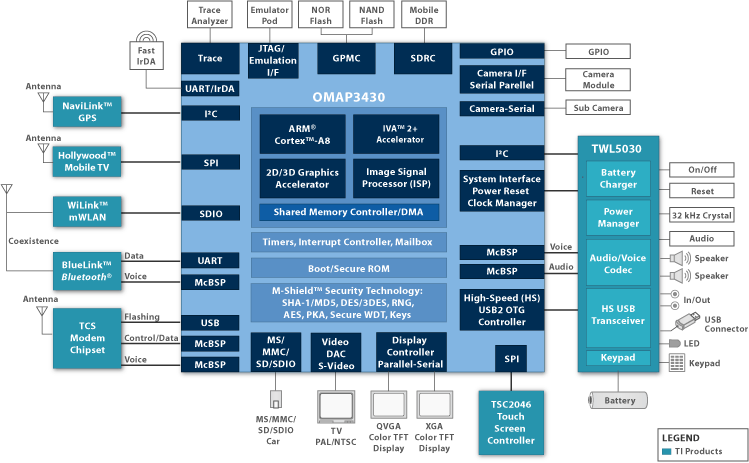
Again, don't worry, you don't have to understand the above illustration. The Texas Instruments OMAP 3 Platform is split into three groups of SoCs; entry level (3410/3610), mid-level (3420/3620) and high-end (3430/3440/3630/3640). All of them have features in common, for example; they all have an ARM Cortex A8 microprocessor, an integrated image signal processor (ISP), an "Image, Video, Audio" (IVA) accelerator, support for display resolutions up to XGA(1024x768px) and WXGA(1280x720px), video output in Composite and S-Video formats, M-Shield Mobile Technology and SmartReflex Technology.
From what we know, Texas Instruments (TI) hasn't made significant changes in the Cortex A8 applications processor itself. Instead, TI focused on building the SoC around it with its own technologies. For example, TI has included its own ISP to aid the Cortex A8 processing the images coming from the device's camera; we also have the IVA accelerator enabling multi-standard decoding and encoding (up to HD resolutions), different options to output our TI OMAP 3 powered device to our TVs, and support for very high resolution screens. We also have TI's own M-Shield Mobile Technology, which works together with ARM's TrustZone technology for protecting our personal information and SmartReflex, which improves battery life by cutting the power to different units inside the SoC which are in an idle state. Finally, we can see today's most common encryption algorithms implemented inside the chip, like AES and DES.
Depending on which version of the chip, we'll also find a PowerVR SGX Graphics Processor Unit (GPU), which is compliant with the OpenGL 1.1 ES and OpenGL 2.0 ES standards (it's the same GPU running inside the iPhone 3GS), up to DVD quality video recording and support for 12 Megapixel cameras. The OMAP 3 Platform chips come in two flavors, 65nm (34xx series) and 45 nm (36xx series), where the 45 nm chips use their lower power requirements to achieve faster clock speeds while keeping nearly the same power consumption. The chip powering both the Palm Pre and the Motorola Droid is the high-end TI OMAP 3430, which comes with all the previous features, except the performance boost of its 45nm counterpart.
Why we wouldn't buy an ARM11-powered smartphone

With all these improvements, it's really annoying to see that Nokia did not wait a couple of months and make its flagship phone, the N97, feature an ARM Cortex A8 processor. The secret behind the iPhone and the iPhone 3G's astonishing performance using an ARM11 core is very, very tight integration of software and hardware, which is possible since the platform is essentially C/C++ (or Objective-C) based, two programming languages which do not introduce more layers between the actual hardware and the OS. We suspect the iPhone and the iPhone 3G handle playing music and browsing at the same time so well because Apple's built the music player in the heart of the Operating System, which is not the case of Symbian, Android, WM, etc. where the music player is an application running on top of the OS. Android's case is actually different, since all apps run inside a virtual machine (using virtual instructions), which are then translated into actual ARMv6/v7 hardware instructions.
We cannot blame Google and all the handset manufacturers for shipping so many phones with an ARM11 processor, until the Donut version of Android (1.6) was released, which allowed the OS to use a different processor than the famous Qualcomm MSM 7201A. A couple of months later, the Droid arrived, and last month, the Nexus One was made official and started shipping. Both of these phones, and others like the Acer Liquid, feature an ARM Cortex A8 processor, and we don't understand how new (or upcoming) phones like the Motorola Devour or the HTC Legend still feature an ARM11 processor while pretending to be medium-end smartphones, because they simply can't keep up with the OS.
Clock speed by itself cannot be used to say that an ARM11 powered phone with an 800Mhz processor, is faster than a 550 Mhz Droid/Milestone, because in terms of performance, the aforementioned ARM11 achieves a peak performance of 800 MIPS, while the Droid can get up to 1100 MIPS. Whether the Droid is worse or not than the 1Ghz Qualcomm Snapdragon (which is Cortex A8 based) powering the Nexus One is not why we're here, but if we were to put the Droid at 1Ghz and the same amount of RAM (512), the differences with the Nexus One would be left to how Texas Instruments and Qualcomm implemented the ARM Cortex A8 into a chip.
To be honest, we've not had the pleasure of using an ARM Cortex A8 powered smartphone yet, and we'd like to see if the performance promised by the new architecture lives up to its tale. From what we've seen, the Droid is certainly a huge step forward, although with time, we believe a Droid would suffer a loss in performance similar to what we see in our ARM11 Androids, but less (we hope for a lot less, actually). Seeing videos of the Nexus One though, left us puzzled. The Snapdragon processor was simply laughing every time the reviewers pressed the Home button, which in our ARM11 phones, can cause up to a 20 or 30 second delay before we can use the device again. The Droid didn't always look so blazingly fast, but it definitely looked to be a lot better than our ARM11s.
The Toshiba TG01, Palm Pre, iPhone 3GS, HTC HD2, Motorola Droid, Acer Liquid, Acer Liquid e, Sony Ericsson Satio & Xperia X10, Nokia N900, HTC Desire and the Nexus One are all examples of smartphones powered by today's hardware architecture, and for people like us, who just demand performance and responsiveness from our devices, we really don't recommend buying anything less than an ARM Cortex A8 powered smartphone. The only reason we think could make us wonder whether an ARM11 device is worth it or not is an exclusive OS, because frankly, smartphones are all about the OS, and it's why (we think) many would choose a Droid over an HTC HD2, which currently has the best hardware package you can find in a smartphone. Like always, the choice is up to you. Thanks for reading.
Update: Because some sources claim the Samsung Galaxy Spica is powered by a Snapdragon class processor, I've removed the Spica from the comparison between the ARM11 and the Cortex A8. Also fixed a couple of inconsistencies and added a couple of phones to the last paragraph.
References:
http://en.wikipedia.org/wiki/Thread_%28computer_science%29
http://en.wikipedia.org/wiki/Context_switch
http://www.extremetech.com/article2/0,1558,1155318,00.asp
http://en.wikipedia.org/wiki/Superscalar
http://www.anandtech.com/gadgets/showdoc.aspx?i=3595&p=3
http://www.arm.com/products/CPUs/ARM_Cortex-A8.html
http://focus.ti.com/lit/wp/spry112a/spry112a.pdfhttp://users.ece.gatech.edu/~leehs/CS8803/papers/ARMCortexA8.pdf
http://en.wikipedia.org/wiki/SIMD
http://en.wikipedia.org/wiki/Texas_Instruments_OMAP
http://focus.ti.com/general/docs/wtbu/wtbuproductcontent.tsp?templateId=6123&navigationId=11989&contentId=4682
http://focus.ti.com/general/docs/wtbu/wtbuproductcontent.tsp?contentId=14649&navigationId=12643&templateId=6123
http://focus.ti.com/lit/ml/swpt024b/swpt024b.pdf
http://www.engadget.com/2009/10/14/core-values-the-silicon-behind-android/


1 comment:
awesome post, thanks for all that information
Post a Comment